
Compare and save responses
Diff view
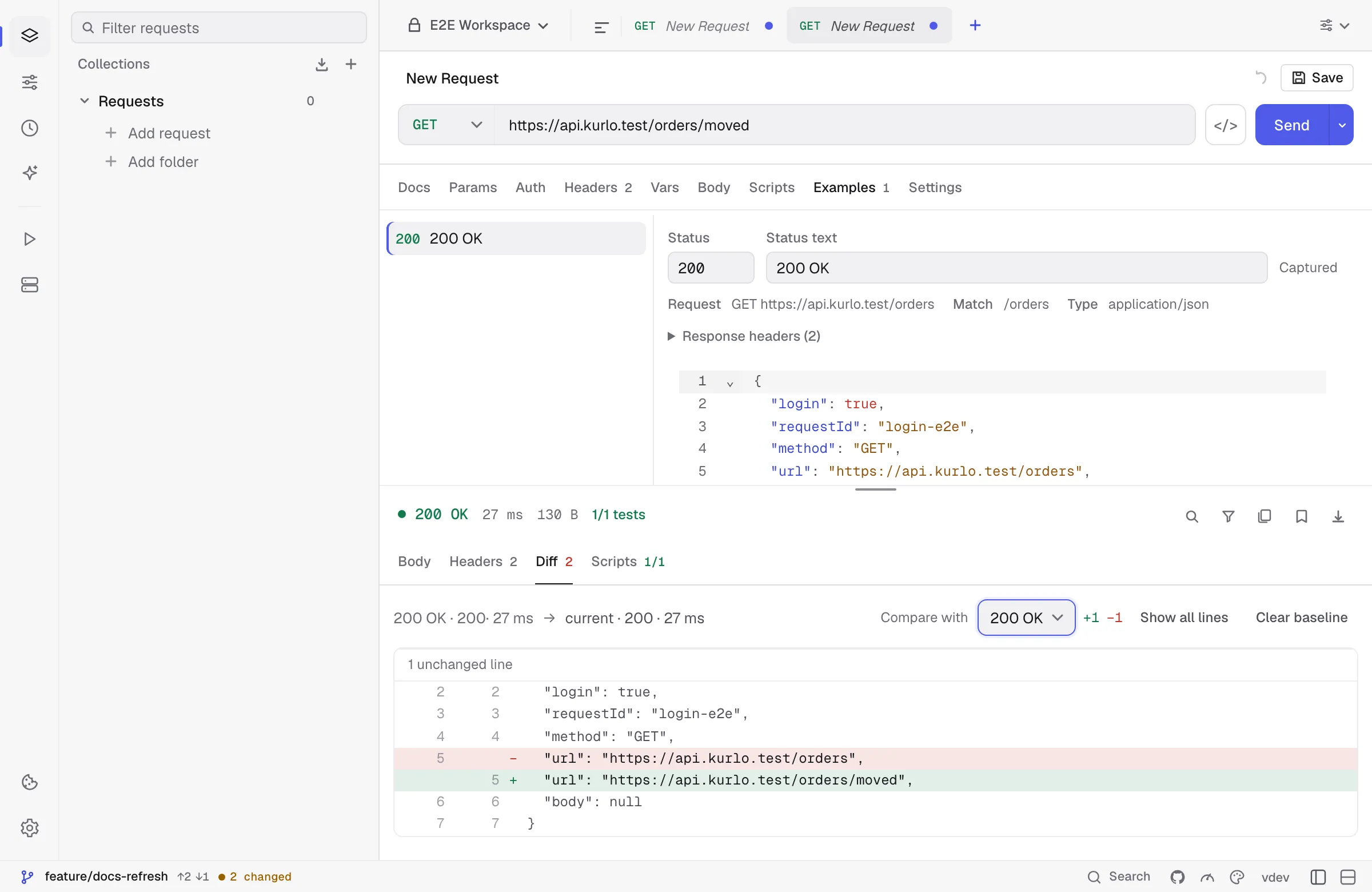
Section titled “Diff view”The Diff tab appears the second time you send the same request. It compares the previous response body with the current one:
- Removed lines are red, added lines are green, and both original line numbers are kept.
- Long unchanged runs collapse to a
… unchanged linesmarker — Show all lines expands them. - Clear baseline forgets the previous response and hides the tab until the next send.
Baselines are per-request and live in memory only; they are never written to the workspace and are dropped when Kurlo restarts.
You can also diff against a saved example instead of the previous response. That is what stops an example from going stale: an endpoint that no longer matches the contract shows up as a diff rather than passing unnoticed. If the example the baseline pointed at is deleted, it falls back to the previous response. See Response examples.
Saving a response as an example
Section titled “Saving a response as an example”Save as example keeps the response — status, headers and body — next to the request that produced it, as a file in your workspace rather than something only you can see. Secrets are redacted on capture. Examples are what the mock server replays. See Response examples.