
Manage the cookie jar
Managing cookies
Section titled “Managing cookies”Open cookies from the cookie icon at the bottom of the activity rail, on the far left of the window. Cookies work like environments: the sidebar lists Browser sync and every domain in the jar, and the main area shows the domain you pick, with its cookie count, how many last only for this session and how many have expired. Click a request tab to go back to your request.
- Find a domain with the filter above the list. A yellow dot and some without a value under a domain mean one of its cookies has no value on this computer.
- Add a domain with + next to the Cookies heading; Kurlo opens a new cookie for it straight away. When the jar is empty, the main area offers to add a cookie for the domain of the open request or any domain you type.
- Read cookies at a glance. The table shows each cookie’s value, path, when it expires and its flags: HttpOnly, Secure, SameSite and Subdomains for cookies sent to subdomains as well. Expired cookies are struck through.
- Cookies from another computer. A cookie created on another machine keeps its value in that machine’s Kurlo profile, and the workspace files only reference it. Kurlo shows such a cookie with an empty value marked Not on this computer, in the Raw editor too, and does not send it. Type the value and save to use it here; saving without a value keeps the reference.
- Set when a cookie expires with the Expires field: pick a day in the calendar, type the time, or choose In 1 hour, Tomorrow, In 7 days or In 30 days. The arrow keys move between days and
Escapecloses the calendar. Clear turns the cookie back into a session cookie. - Edit a cookie by clicking its row. The editor opens under the table;
Cmd/Ctrl Enteror Save stores the change andEscapecloses the editor without saving. - Delete one cookie with the cross at the end of its row. The ••• menu next to Add cookie deletes every cookie of the domain, clears the whole jar, or reloads the jar from disk.
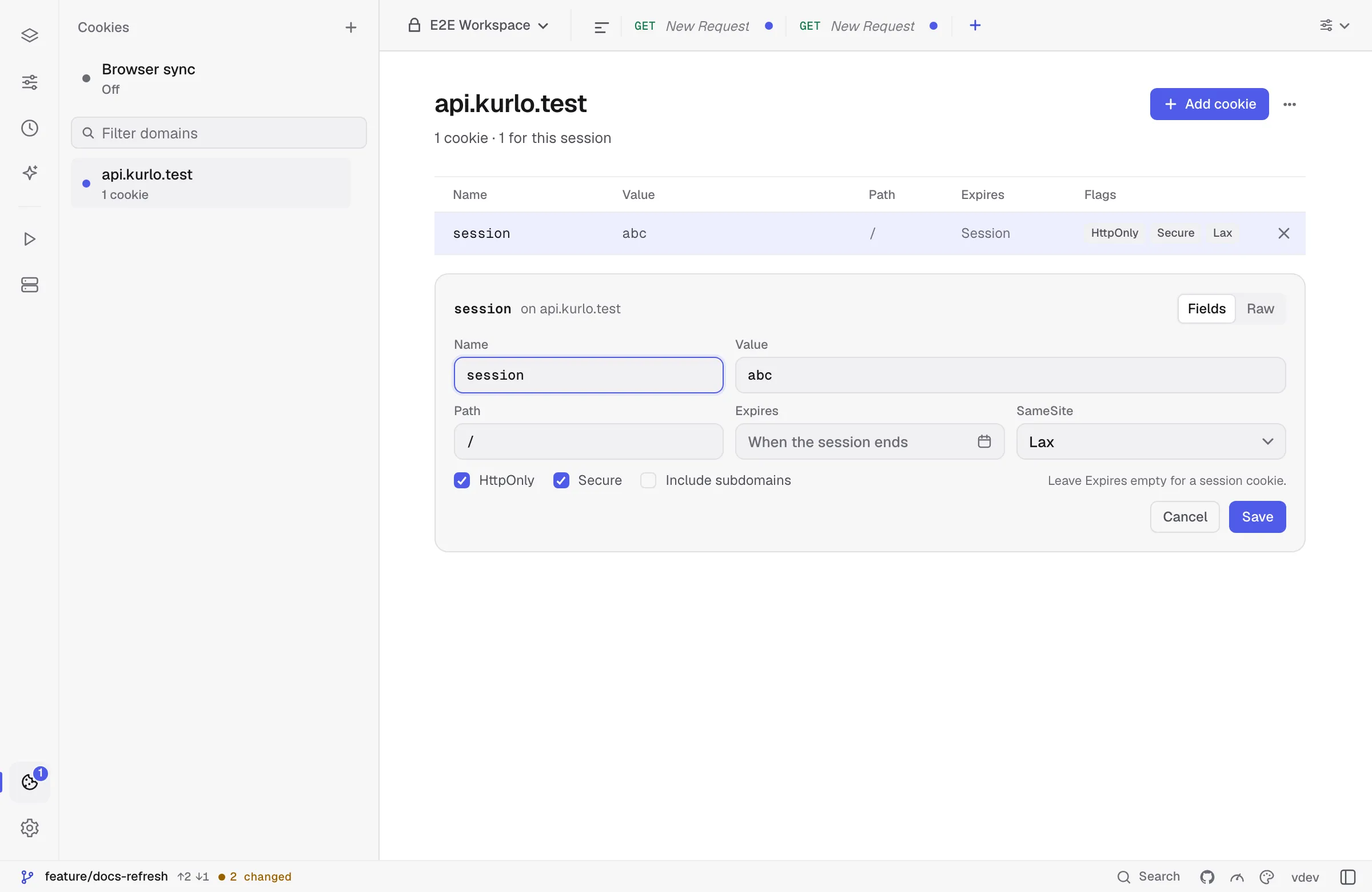
The editor has two modes:
- Fields — name, value, path, expiry date, SameSite, HttpOnly, Secure and Include subdomains. Leave Expires empty for a session cookie.
- Raw — the cookie as
Set-Cookietext, for pasting from DevTools or a server log:
session=abc123; Path=/; Secure; HttpOnly; SameSite=LaxSwitching modes carries the cookie across, and both follow the same rules: SameSite=None needs Secure, and a name cannot contain spaces, = or ;. A Domain= attribute in Raw mode moves the cookie to that domain and makes it apply to subdomains.
Disabling the jar for one request
Section titled “Disabling the jar for one request”Open the request Settings tab and turn off Use the cookie jar. Kurlo will not store cookies from that response and will not attach jar cookies to that request.
You can still send a manual cookie:
Cookie: debug=true; session=manualThis is useful when reproducing a production request exactly from a copied cURL command.