
Secret managers
An environment variable can take its value from a secret manager instead of storing it. The environment file keeps only a reference. Kurlo fetches the value when you send a request, keeps it in memory and shows it as [secret] in responses, history, script logs and test names.
Supported providers:
| Provider | How Kurlo reads it | Where credentials come from |
|---|---|---|
| HashiCorp Vault and OpenBao | HTTP API: KV v1 and v2, dynamic secrets | A token saved on this device, VAULT_TOKEN or ~/.vault-token; AppRole with a secret_id saved on this device or in VAULT_SECRET_ID; LDAP or userpass with a password saved on this device or in VAULT_PASSWORD; Kubernetes auth with the pod’s service account; or OIDC sign-in in the browser |
| 1Password | The op CLI | The 1Password app on this computer, or a service account token saved on this device |
| AWS Secrets Manager and Parameter Store | AWS API | Keys saved on this device, AWS_ACCESS_KEY_ID, the profile in ~/.aws/credentials, or aws configure export-credentials for SSO profiles; optionally an assumed role with MFA |
| Google Secret Manager | Google Cloud API | A service account key saved on this device or in KURLO_GCP_SERVICE_ACCOUNT_KEY, GOOGLE_APPLICATION_CREDENTIALS, application default credentials, or gcloud auth print-access-token |
| Azure Key Vault | Azure API | The Azure CLI (az login), or an app registration with a client secret saved on this device or in AZURE_CLIENT_SECRET |
| Bitwarden Secrets Manager | The bws CLI | A machine account access token saved on this device or in BWS_ACCESS_TOKEN |
| Doppler | Doppler API | A token saved on this device, DOPPLER_TOKEN, or the signed-in doppler CLI |
| Infisical | Infisical API | A token saved on this device or in INFISICAL_TOKEN, or a machine identity (universal auth) with its client secret saved on this device or in INFISICAL_UNIVERSAL_AUTH_CLIENT_SECRET |
| Command | Any program you choose, such as pass | Whatever the program uses |
| Environment variables | The environment of the Kurlo process | Nothing to sign in to |
Kurlo calls the services over their HTTP APIs or their official CLIs. It finds the CLIs in PATH and in the usual install folders, such as /opt/homebrew/bin on macOS and Program Files, AppData\Local and the WinGet links folder on Windows, so op, aws, az and gcloud work even when Kurlo was started before they were added to PATH. Google application default credentials are read from CLOUDSDK_CONFIG when it is set, otherwise from %APPDATA%\gcloud on Windows and ~/.config/gcloud elsewhere. Paths in provider settings may start with ~/, or ~\ on Windows.
Add a provider
Section titled “Add a provider”- Open Environments in the sidebar and click + next to Secret providers.
- Choose the provider type and fill in its address, account, region or project.
- Click Save, then Test connection.
The form checks each field before saving and shows what to fix under it: a missing address or region, a URL without https:// or with a user name and password in it, an AWS region or Google Cloud project in the wrong form, an Azure client ID that is not a GUID, an ID another provider already uses, or a timeout outside 1 second to 10 minutes. Credentials are checked too: tokens cannot contain spaces, and a Google Cloud key must be the whole JSON key file.
Provider settings are saved in workspace.yml, so a Git workspace shares them with your team. Tokens and keys you enter under On this device are stored only on this computer, encrypted like other local secrets. Each person signs in on their own device.
Link a variable
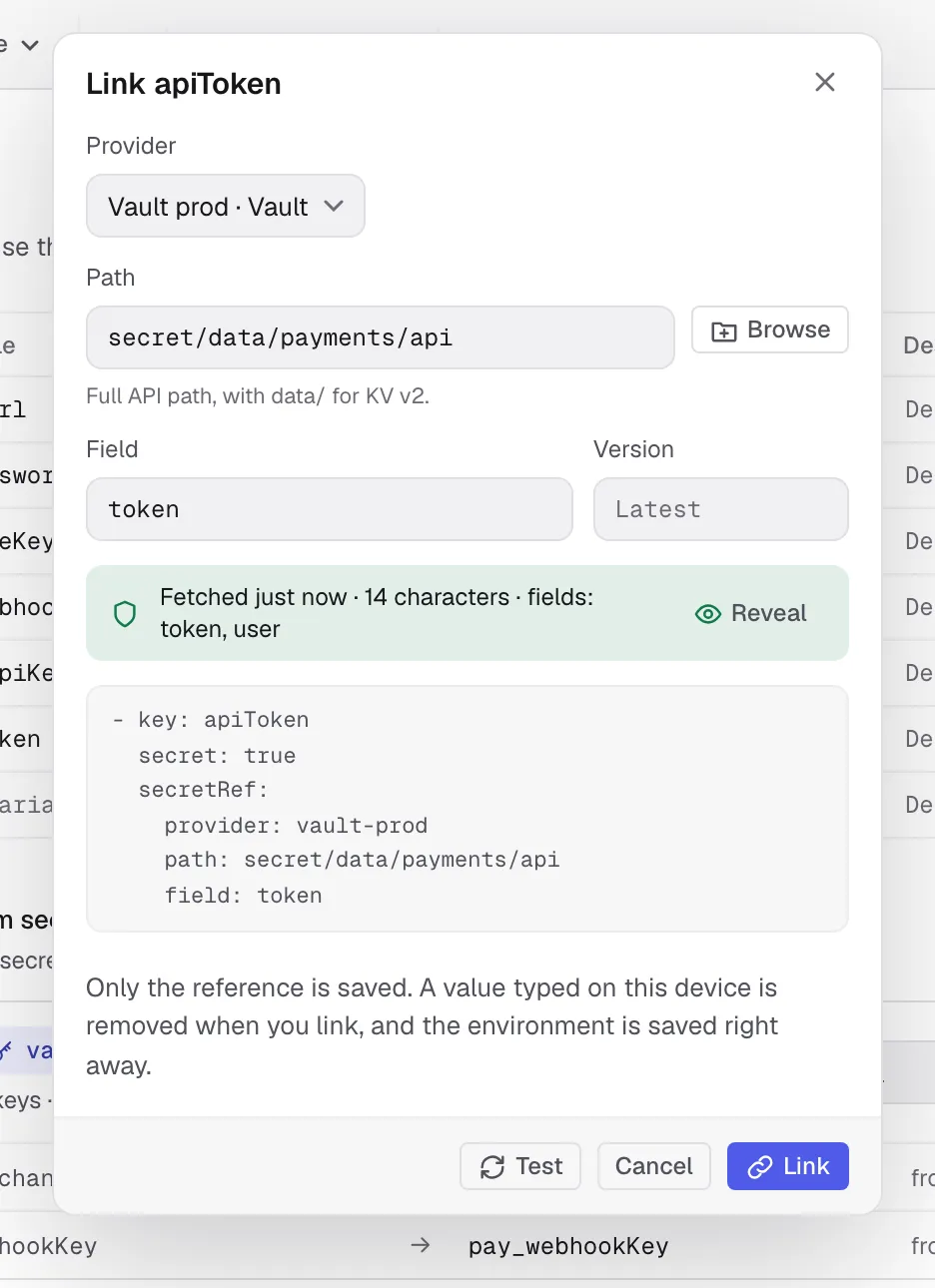
Section titled “Link a variable”Hover a variable row in an environment and click the link icon next to its value. Choose the provider and enter the path:
- Vault: the API path, for example
secret/data/appfor KV v2, and the key in Field. - 1Password:
op://Vault/Item/field, orop://Vault/Itemwith the field label in Field. When several sections use the same label, choose the section-qualified field in Browse. - AWS: the secret name or ARN, or the parameter name. For a JSON secret, put the key in Field. AWS Secrets Manager accepts a version ID or staging label such as
blue-greenin Version. - Google Secret Manager: the secret name, or
projects/<project>/secrets/<name>for another project. Version is a version number; without it Kurlo readslatest. - Azure Key Vault: the secret name. Version is a version id.
- Bitwarden: the secret id or its name. For
projects/<project id>, put the secret name in Field. - Doppler:
project/configwith the secret name in Field, orproject/config/NAME. - Infisical: the environment slug and an optional folder, such as
prod/backend, with the secret name in Field. - Command: the path the command receives as
{path}. - Environment variables: the variable name.
For a JSON value, put the key in Field with any provider.
You can also paste a reference copied from the provider into Path. Kurlo recognizes it, picks the matching provider and fills in the path, field and version:
| Paste | Becomes |
|---|---|
op://Payments/Stripe/credential | 1Password reference |
arn:aws:secretsmanager:eu-central-1:123456789012:secret:prod/db-AbCdEf | AWS Secrets Manager secret, on the provider in that region |
arn:aws:ssm:eu-central-1:123456789012:parameter/prod/api-key | Parameter /prod/api-key |
projects/my-project/secrets/db/versions/3 | Google secret projects/my-project/secrets/db, version 3 |
https://team.vault.azure.net/secrets/db-password/0b1c… | Azure secret db-password and its version, on the provider for that vault |
https://vault.example.com/v1/secret/data/app or a Vault UI link | Vault path secret/data/app, on the provider with that address |
Add #key to the end of any of them to fill Field. If no provider matches, Kurlo says which one to add.
Browse lists what the provider can show you: Vault mounts, folders and secrets, 1Password vaults, items and fields, AWS secrets and parameters, Google and Azure secrets, Bitwarden projects and secrets, Doppler projects, configs and secret names, and Infisical environments, folders and secret names. Click an entry to use it, or Open to go inside. Browsing shows names only, and needs the provider to be trusted. Vault lists the paths its policy permits. Google Cloud and Azure check the permission to list secrets when you click Test connection. If listing is forbidden, enter a known path and click Test on the link to check read access.
Click Test to fetch the secret without showing it. Kurlo reports its length and the fields it has. Reveal shows the value for 30 seconds. Link replaces the value with the reference and saves the environment right away.
A linked row shows Linked and the reference instead of a value. Click the reference to change or unlink it. Inherited environments and {{name}} suggestions show where the value comes from.
Import a whole secret
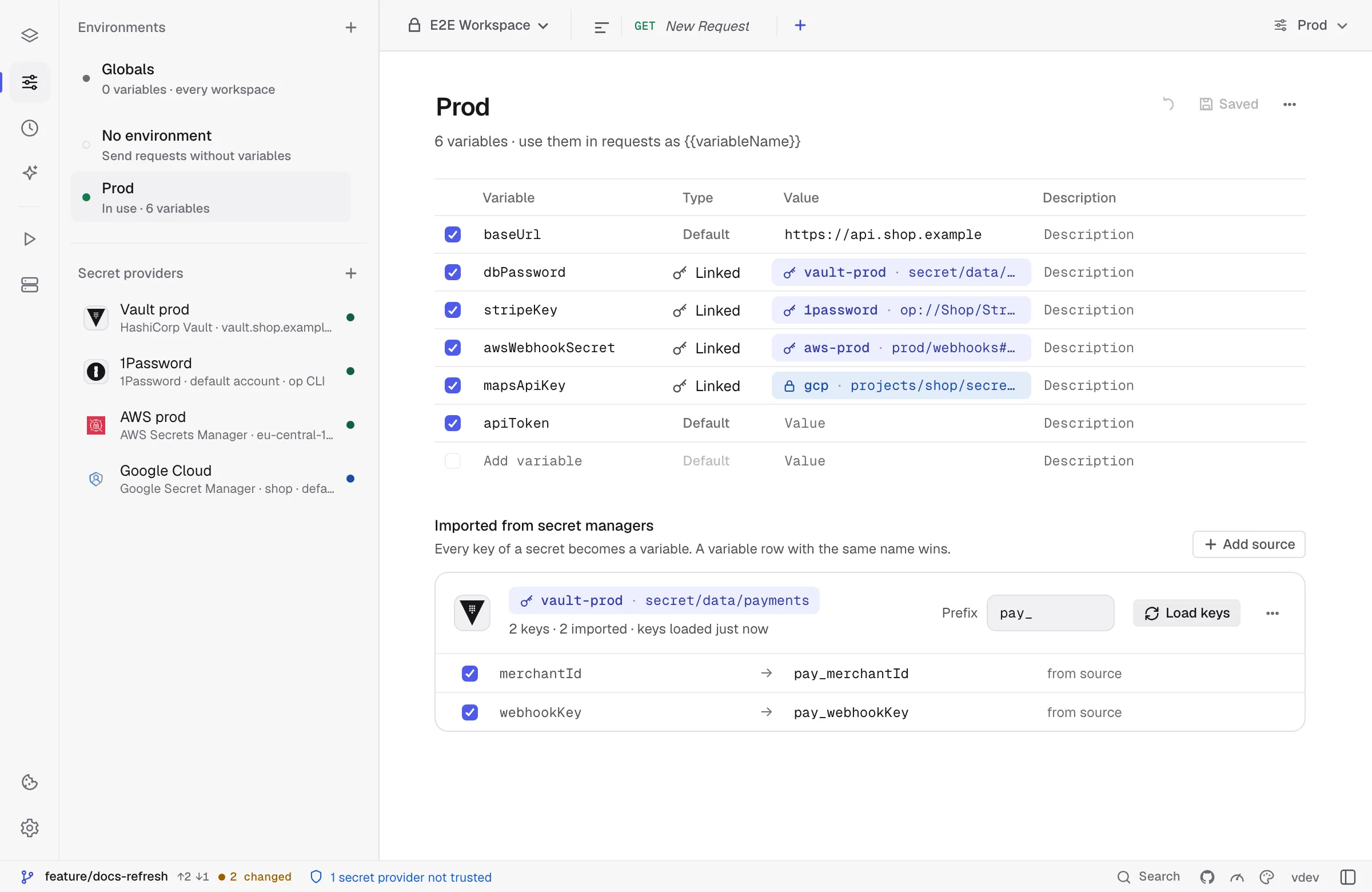
Section titled “Import a whole secret”To turn every key of a secret into variables, open the environment and click Add source under Imported from secret managers. Choose the provider and the secret: a Vault KV secret, a 1Password item (op://Vault/Item), a JSON secret in AWS, Google Cloud or Azure, a Bitwarden project (projects/<project id>), a Doppler config (project/config) or an Infisical folder (prod/backend). Browse helps you find it. Prefix is added before each key, so db_ turns password into db_password. Load keys reads the current field names from the provider each time you click it.
The source lists each key and the variable it becomes. Clear a key’s checkbox to skip it. A key is marked when something else wins:
- The variable row wins: the environment, or one it inherits from, has a row with that name.
- … wins: a later source in the same environment imports the same name.
- Not in the secret: the key is listed in the file but the secret no longer has it.
Kurlo keeps the key names, not the values, on this device so {{name}} suggestions and sends work before you open the provider again. Another person sees Keys are not loaded on this device yet until they click Load keys. Sources are saved in the environment file as secretSources; see the environment reference.
A value a script sets for an imported variable lasts for the session and is not saved.
Trust on this device
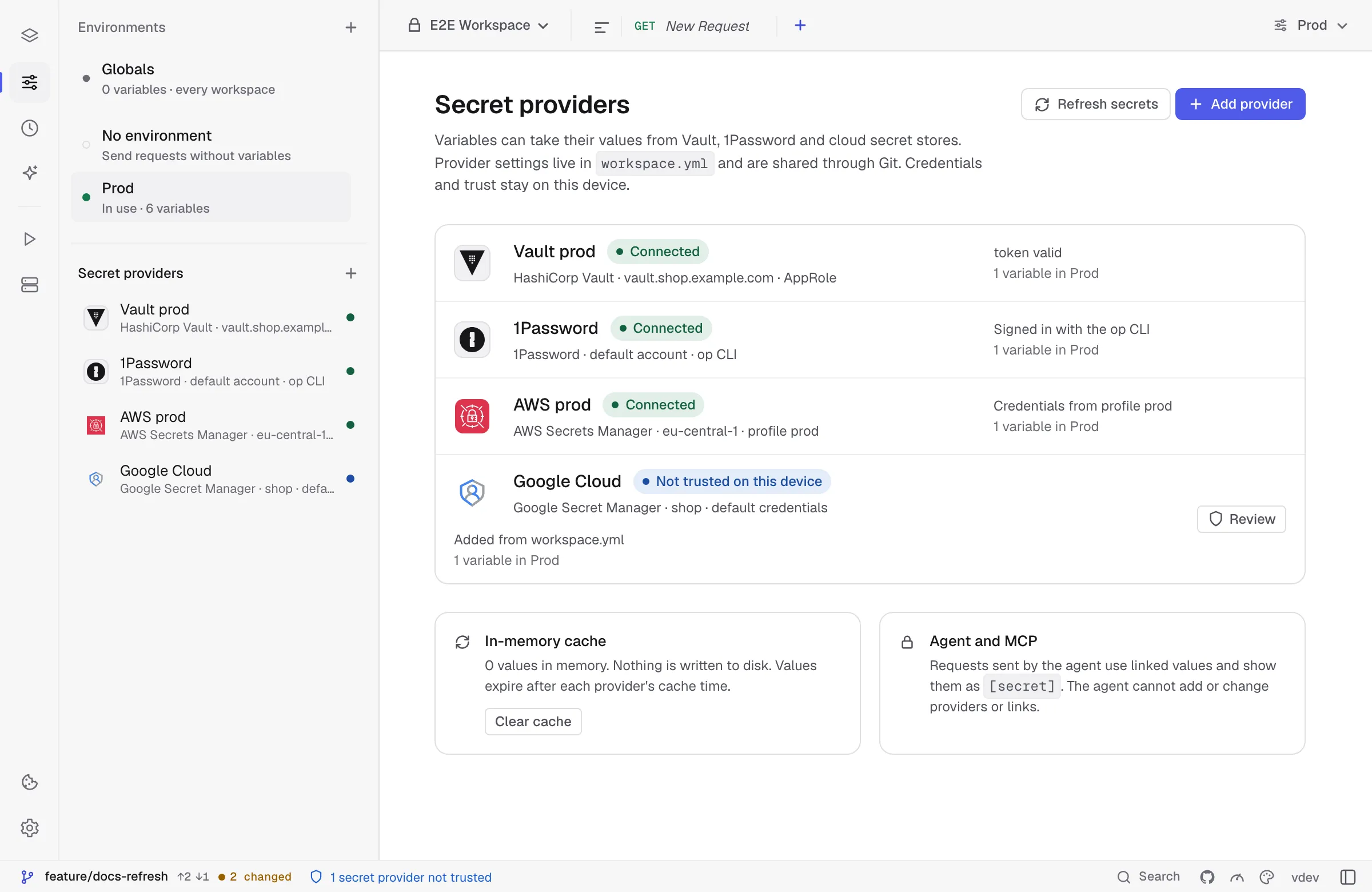
Section titled “Trust on this device”A provider from a cloned or pulled workspace is not trusted until you review it. Until then, Kurlo sends no credentials to it, and requests that use its variables are not sent. Kurlo asks again when the address, namespace, account, region, profile, project, command or sign-in method changes. Providers you add or edit in Kurlo are trusted on your device right away.
Open the provider and click Review and trust, or Revoke trust to stop using it on this device.
Vault sign-in methods
Section titled “Vault sign-in methods”- Token reads a token saved on this device, then
VAULT_TOKEN, then~/.vault-token. - AppRole logs in with the role ID from
workspace.ymland asecret_idfrom this device orVAULT_SECRET_ID. - Kubernetes logs in with the service account token of the pod Kurlo runs in, by default
/var/run/secrets/kubernetes.io/serviceaccount/token. Use it forkurlo runinside a cluster. - LDAP and Userpass log in with a user name and password. Leave User name empty in the form so each person saves their own under On this device; the CLI reads
VAULT_USERNAMEandVAULT_PASSWORD. - OIDC opens your browser to sign in with your identity provider. Add the redirect URI,
http://localhost:8250/oidc/callbackby default, toallowed_redirect_urisof the Vault role. The token stays in memory until Kurlo quits or you clear the secret cache. The CLI cannot sign in this way.
AWS roles and MFA
Section titled “AWS roles and MFA”To read secrets as another role, enter its Role ARN. Kurlo signs in with your usual AWS credentials, calls AssumeRole and uses the role for one hour. Add an External ID if the role’s trust policy asks for one.
If the role requires MFA, enter your MFA device ARN. Kurlo then shows an MFA code field under On this device: type the six digits and click Save. The code is used once to start the session and is never stored. When the hour ends, or after Refresh secrets, Kurlo asks for a new code. In the CLI, set AWS_MFA_CODE.
secretProviders: - id: payments type: aws-secrets-manager region: eu-central-1 roleArn: arn:aws:iam::123456789012:role/payments-read mfaSerial: arn:aws:iam::123456789012:mfa/adaPermissions each provider needs
Section titled “Permissions each provider needs”Give Kurlo read access only. Test connection and Browse need the listing rights; reading linked values needs only the read rights.
| Provider | Read a value | Browse |
|---|---|---|
| Vault | read on the secret path, for KV v2 <mount>/data/<path> | list on <mount>/metadata/*, read on sys/internal/ui/mounts |
| 1Password | Read access to the vault, for a service account | The same |
| AWS Secrets Manager | secretsmanager:GetSecretValue, and kms:Decrypt for a customer-managed key | secretsmanager:ListSecrets |
| AWS Parameter Store | ssm:GetParameter, and kms:Decrypt for SecureString | ssm:DescribeParameters |
| AWS role | sts:AssumeRole on the role for your base credentials | — |
| Google Secret Manager | roles/secretmanager.secretAccessor | roles/secretmanager.viewer |
| Azure Key Vault | Key Vault Secrets User role, or a get secret access policy | list secret access policy |
| Bitwarden | Read access to the project for the machine account | The same |
| Doppler | A read-only service token for the config, or a personal token | A personal or workplace token |
| Infisical | Viewer role on the project for the machine identity | The same |
Command provider
Section titled “Command provider”A command provider runs a program and uses what it prints as the value, without the trailing newline. Use it for pass, gopass, security on macOS or a helper your company provides. {path} and {version} in the arguments are replaced with the reference; without {path}, the path is added as the last argument. Kurlo starts the program directly, without a shell. If the program prints JSON, pick a key with Field.
secretProviders: - id: pass type: command command: [pass, show, "{path}"]Because it runs a program on your computer, a command provider from a cloned workspace never runs until you trust it, and the CLI runs it only with --allow-secret-commands.
When a value cannot be fetched
Section titled “When a value cannot be fetched”Kurlo never sends a request with an empty secret. If a linked variable the request uses cannot be resolved, the response area lists each one with the reason and a button that fixes it: Sign in, Review, Open provider or Edit link. Retry clears the cache and sends again. Linked variables the request does not use do not block it.
The Response time breakdown shows how long Kurlo spent fetching linked secrets.
Fetched values stay in memory for five minutes by default. Change it per provider under Cache: 1 minute, 5 minutes, 15 minutes, the whole session, or Custom with any duration up to 24 hours, such as 2h. A longer time means fewer calls to the provider; it does not use more memory, because Kurlo keeps one copy of each value either way. Vault dynamic secrets expire earlier when their lease ends. Refresh secrets on the providers page or in the command palette clears the cache.
Scripts
Section titled “Scripts”Scripts read a linked value with pm.environment.get("name"). Kurlo fetches it only when the name appears in the script as a string. A linked value a script copies into another variable is stored as [secret].
Scripts written for Postman Vault work too: await pm.vault.get("name") returns the value of the variable name, linked or not, and await can be used at the top level of a script. pm.vault.set and pm.vault.unset fail with a message, because Kurlo changes secrets only in the secret manager.
In the Collection Runner
Section titled “In the Collection Runner”The Runner checks linked secrets for the selected requests before sending the first one. If a required link fails or returns an empty value, the run stops before sending any request. Correct the link or update the value at the provider, then start the run again.
In the CLI and CI
Section titled “In the CLI and CI”kurlo run fetches the linked variables that the selected requests use before it sends the first request. Values are masked as [secret] in the terminal output and in JSON and JUnit reports, and --export-environment leaves them out.
The CLI uses the credentials of the machine it runs on: VAULT_TOKEN or ~/.vault-token, VAULT_SECRET_ID for AppRole, VAULT_USERNAME and VAULT_PASSWORD for LDAP and userpass, the pod’s service account for Vault Kubernetes auth, OP_SERVICE_ACCOUNT_TOKEN or the signed-in op CLI, the standard AWS variables, profiles and SSO, with AWS_MFA_CODE for a role that needs MFA, KURLO_GCP_SERVICE_ACCOUNT_KEY with the key file contents, GOOGLE_APPLICATION_CREDENTIALS or gcloud, az login or AZURE_CLIENT_SECRET, BWS_ACCESS_TOKEN, DOPPLER_TOKEN, and INFISICAL_TOKEN or INFISICAL_UNIVERSAL_AUTH_CLIENT_SECRET. Tokens saved in the app are not read. The CLI does not ask you to trust providers: running it is the decision. The one exception is a command provider, which runs only with --allow-secret-commands.
To move credentials you already saved in the app to CI, open the provider, click ••• and choose Export for CI…. Kurlo lists the variables the CLI reads for this provider and saves them to a .env file that only you can read. Credentials you did not save in the app are left empty for you to fill in. The file holds secrets in plain text: add each line as a CI secret, or load the file in the job with set -a; . ./vault.ci.env; set +a, and delete it afterwards. Keep it out of Git.
If a value cannot be fetched, the run stops with exit code 2 and lists each variable, its reference and the reason. Nothing is sent.
When you import a whole secret, a template such as {{db_token}} or a script lookup such as pm.environment.get('db_token') makes the CLI look up the matching field. Explicit environment variables and CLI overrides take precedence. With --secret-providers=off, supply any referenced name that matches the import prefix using --var or --env-file. Selecting individual keys tells the CLI exactly which names the source provides.
| Flag | Meaning |
|---|---|
--var name=value, --env-file | Use this value and skip the provider for this variable. |
--secret-providers=off | Do not contact providers. Every linked variable the run uses needs --var or --env-file. |
--secret-timeout 30s | Time limit for each provider call, instead of the provider’s own setting. |
--allow-secret-commands | Let command providers run their program. Without it, variables linked to them stop the run. |
In GitHub Actions, sign in to the provider in an earlier step and Kurlo picks up the credentials:
- uses: hashicorp/vault-action@v3 with: url: https://vault.example.com method: jwt role: ci exportToken: true- run: npx -y @kurlo/cli run ./workspace --env Prod --reporter junit > results.xmlFor AWS, use aws-actions/configure-aws-credentials; for Google Cloud, google-github-actions/auth; for Azure, azure/login. For 1Password, Bitwarden, Doppler and Infisical, set OP_SERVICE_ACCOUNT_TOKEN, BWS_ACCESS_TOKEN, DOPPLER_TOKEN or INFISICAL_TOKEN from a repository secret, and install the op or bws CLI where needed.
Load tests
Section titled “Load tests”A load test run from Kurlo or with kurlo load run fetches linked values before it starts k6 and passes them through the process environment, as it does for other secrets. An exported k6 script never contains them, even with Include secrets or --inline-secrets: it reads them from __ENV, so pass them with k6 run -e name=….
AI agents and MCP
Section titled “AI agents and MCP”Requests that AI agents send through Kurlo use linked values and get [secret] in their place. list_environments shows a linked variable as [secret from <provider>] and lists imported secrets under importedFrom. Agents cannot add or change providers, links, sources or linked variables: set_variable, patch_environment and apply_changes refuse them.
kurlo mcp fetches linked values only for the workspace the app has open, with the trust and tokens you set up in the app. For any other workspace folder it stops with an error, and the agent can pass the value in variables.
Postman Vault
Section titled “Postman Vault”Postman collections and environments can refer to Postman Vault as {{vault:name}}. Kurlo reads {{vault:name}} as the variable name, with any provider, everywhere a {{variable}} works: URL, params, headers, body, auth, scripts’ pm.variables.replaceIn, the Collection Runner, kurlo run, load tests and AI agents. An imported collection keeps these references and lists them after the import: add a variable with each name to an environment and link it to a provider. Scripts that call pm.vault.get("name") keep working without changes.
Type {{ and Kurlo offers vault: when the environment has secret variables. After {{vault:, the list shows only linked and secret variables, linked ones first, with the provider they come from. A {{vault:name}} that no variable matches is underlined like any undefined variable. If a variable is itself named vault:name, it wins.
Exported environments contain linked variables as secrets with empty values.