
Writing to the workspace
The write tools change the same YAML files the app writes, through the same code, so the result looks exactly as if you had made it in the app. In a Git-backed workspace every change shows up in Git, and a deletion can be undone from history. Each result names the file it wrote.
For the HTTP and GraphQL shorthand, save_request without request creates a request. It needs a url, and a collection unless the workspace has only one. With request, the id or path of an existing one, it changes only the fields the call passes. params, headers and form replace the whole list. folder puts the request in a folder, creating it if needed, and collection moves it to another collection. The other fields are:
| Field | Meaning |
|---|---|
name | Defaults to the method and path, such as POST /orders. |
type | http (the default) or graphql. |
method, url | url may use {{variables}}, such as {{baseUrl}}/orders, and :name path variables, such as /orders/:orderId. |
pathVariables | Values for the URL’s :name segments, such as [{"key": "orderId", "value": "{{orderId}}"}]. Replaces the whole list. get_request returns them under the same name. |
body, bodyType | A JSON body is stored as JSON and anything else as text, unless bodyType says xml, html, urlencoded, form or none. |
query, variables | The query and variables of a GraphQL request. |
auth | inherit (the default, the collection’s auth), none, bearer with token, basic with username and password, or apikey with key, value and in. |
preRequestScript, testScript | JavaScript with the Postman pm.* API. pm.test calls in testScript become the request’s tests, which run_request and run_collection report. |
assertions | Checks without code, such as [{"target": "status", "operator": "eq", "value": "201"}]. Operators: eq, neq, gt, gte, lt, lte, in, notIn, contains, notContains, matches, exists, notExists, type, length. Replaces the whole list; [] removes them. get_request returns them, and run_request reports them with the tests. |
notes | Notes shown with the request. |
Workspace YAML and partial edits
Section titled “Workspace YAML and partial edits”Pass the yaml argument to save_request for HTTP (including SSE), GraphQL, WebSocket, Socket.IO, gRPC, MCP or AI requests. Use a single version: 1 document with a request mapping and the fields in the workspace format. Kurlo can assign the request ID. Pass collection to choose the target collection or use collectionId in the document. Use request to edit an existing request. Call get_request with format: "yaml" to inspect its workspace fields, including protocol-specific settings. The output omits stored credentials.
Pass request and a patch object to patch_request. It merges nested objects, replaces arrays and removes fields set to null. For example, {"request":"Orders/List orders","patch":{"requestNotes":"Returns recent orders"}} changes only the notes. Use the workspace field names for authentication, client certificate settings and scripts. NTLM uses auth.type: ntlm, basicUser and basicPass.
Batch edits
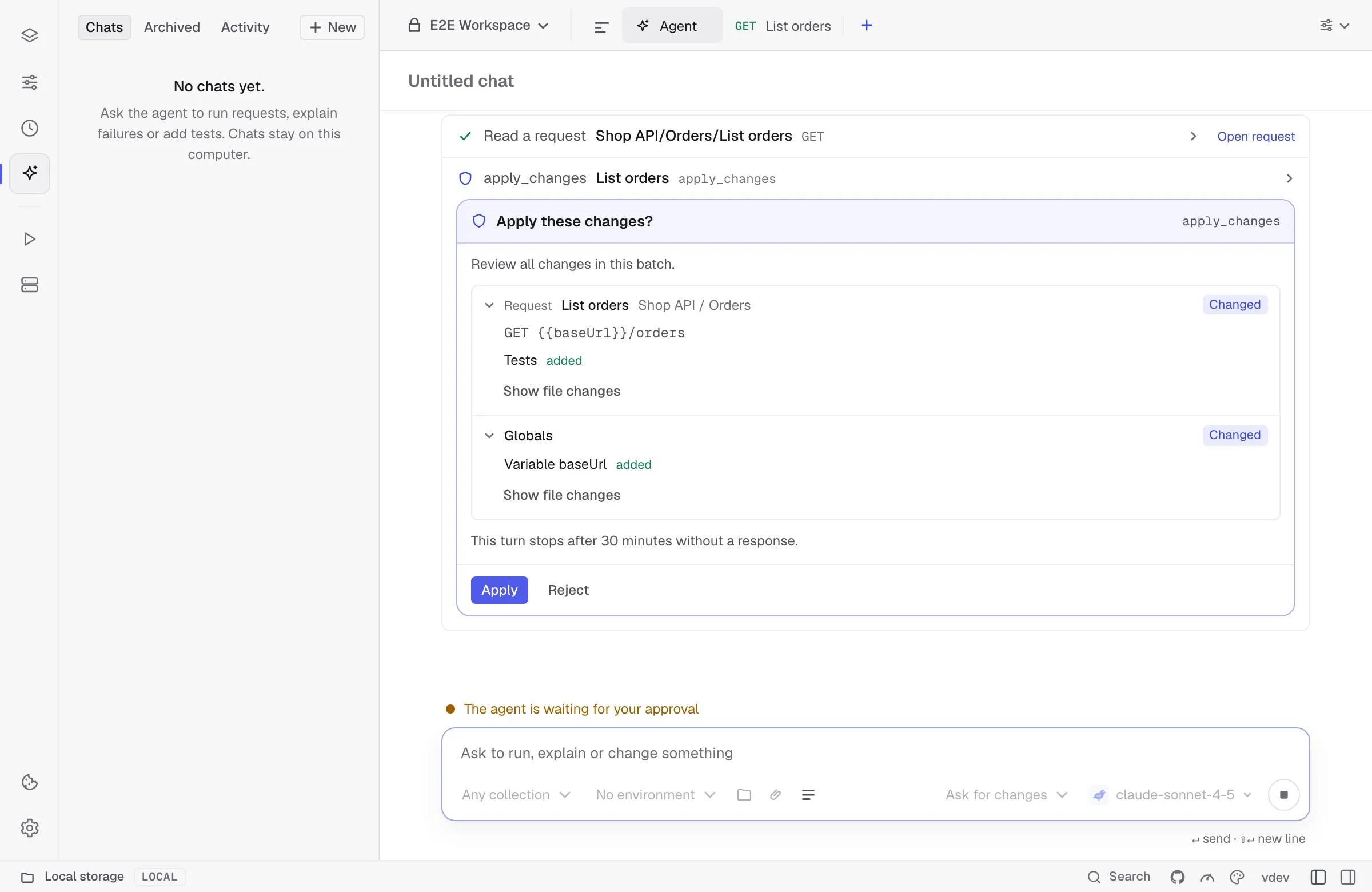
Section titled “Batch edits”Pass an operations array to apply_changes. Each entry has a tool name and an arguments object. Operations run in order, so an edit can refer to a request created earlier in the batch. If validation fails, Kurlo saves none of the edits. In Agent Mode, all affected files appear in one review with one Apply button.
The results from run_request and run_collection include the logs from collection, folder and request scripts.
| Operation | Arguments |
|---|---|
create_collection, save_request, patch_request, delete_request, save_example, set_variable | Same arguments as the standalone tools. |
duplicate_request | request and an optional patch for the copy. |
patch_collection | collection and patch for the name, description, defaults, folder paths or folder defaults. Set scripts and authentication in defaults or folderDefaults. |
move_folder, duplicate_folder | collection, from and to as slash-separated folder paths, and optional targetCollection. Includes nested requests and folder defaults. |
duplicate_collection | collection and optional name. Copies requests, examples and defaults. |
create_environment, patch_environment, delete_environment | Create with name and optional workspace and patch. Update with environment and patch for name, parentId or values; values replaces the whole list. values (or variables) is a list of {key, value} rows with optional description and enabled, or an object such as {"baseUrl": "https://api.example.com"}, so one batch can create many environments with their variables. Rows marked secret are refused: add secrets in the app. Delete with environment. |
patch_example, delete_example | request and example by name or ID. Pass a patch object to edit the example. |
edit_global | key and value to create or update, name to rename, or delete: true to remove. Open the workspace in Kurlo first. |
Globals stay in the encrypted local profile. Agent Mode shows global edits alongside workspace files in the same review. Set secret globals in Kurlo.
OAuth 2.0 sign-in
Section titled “OAuth 2.0 sign-in”Call authorize_oauth2 with a saved request ID or path and, if needed, its environment. For Authorization Code and Device Code, approve the call and finish sign-in in your browser. An external MCP client needs to request progress notifications to receive the URL or device code. Client Credentials and Password use the saved configuration directly. Tokens stay in memory for the current Agent Mode turn or external MCP connection and stay out of tool results.
Secrets stay out
Section titled “Secrets stay out”The write tools never put a secret in a file. A bearer token, password or API key value has to be a variable reference such as {{apiToken}}, and a literal value is refused. Add the value in the app as a variable marked secret, and the request uses it. Existing secrets are masked on reads. Omit fields containing saved secrets from a patch to preserve them. The YAML and patch tools accept normal variable references in authentication fields and refuse internal vault placeholders.