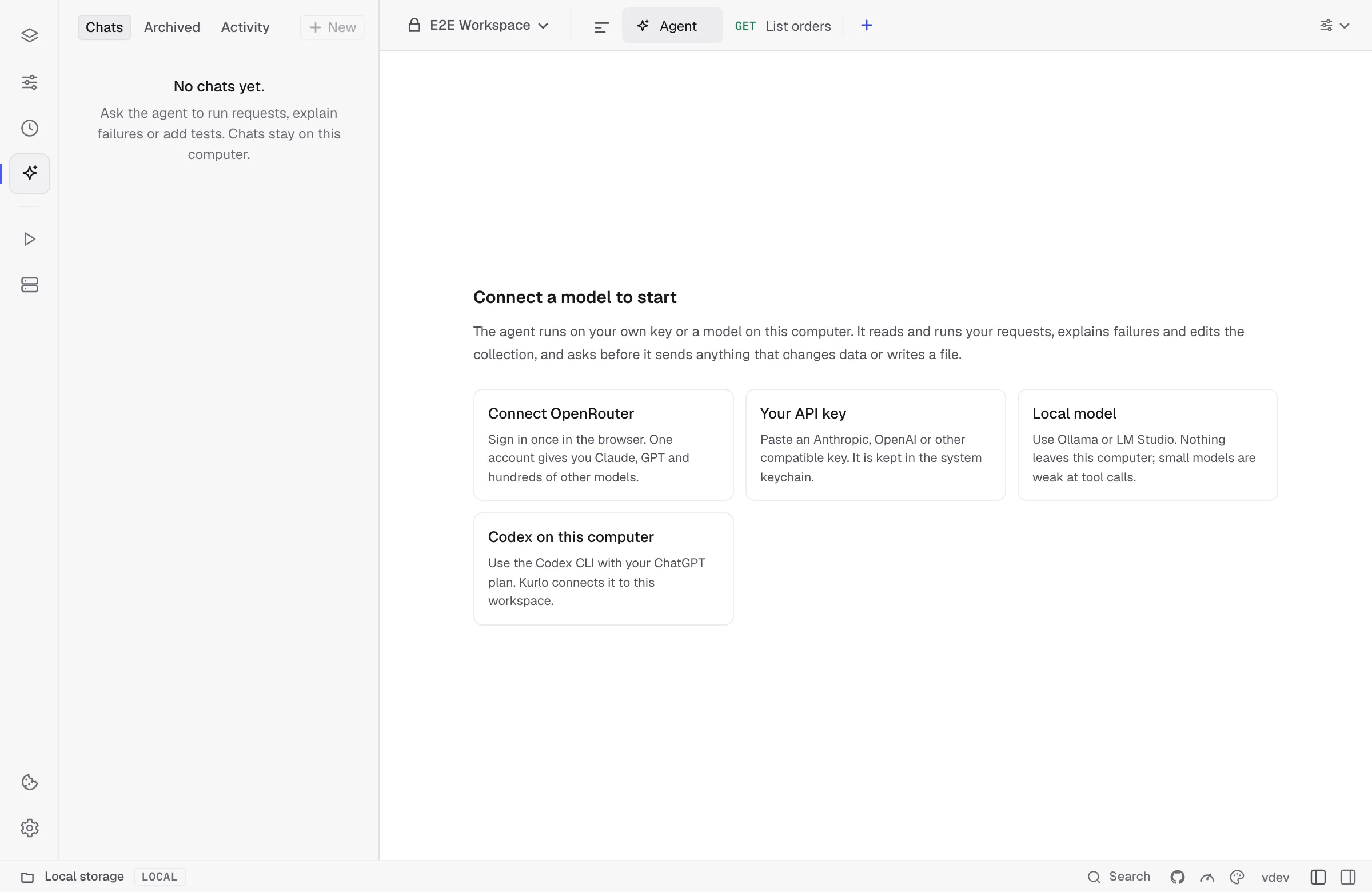
Open the agent
Click the sparkle icon in the activity bar on the left, or press Alt Cmd/Ctrl 4. Until you open it for the first time, the icon carries a small blue dot. The sidebar has New chat at the top and your chats below it, newest first under Today and Earlier; type in Filter chats to find one by its name. Each chat is marked with the agent it runs on: the Kurlo bird for the Kurlo agent, the Codex and Claude Code marks for those agents; an amber dot instead of the time means the chat waits for your approval. New beside Chats starts a new chat. The main area opens the Agent tab. When you switch to another tab, such as a request the agent opened, the sidebar goes back to what it showed before, and returns to your chats when you come back to Agent.
Without a connected model the tab offers four ways to connect one: Connect OpenRouter signs you in through the browser, Your API key opens the key form, Local model looks for Ollama and LM Studio on this computer, and Codex on this computer opens the Codex connection in Settings → AI.
An empty chat offers four starting tasks, such as Why did my request fail? and Run and check the collection. Clicking one puts its text in the message box.